Layouts
June 23, 2026
Last updated on July 31, 2026
OneMore window layouts are saved arrangements of OneNote windows, including their screen position, size, z-order (stacking), and the page displayed in each window.
You can open and position a number of windows, each displaying a preferred page, possibly across notebooks and sections. Then save that as a named window layout.
You can save any number of distinctly named layouts, each with their own complement of windows and pages, and then recover any of them at any time. The windows are restored in their original position and stacking z-order.
Any open windows are not closed or disturbed. Any window defined in the layout will be opened and positioned. If a layout contains a page that is already opened in an existing window, that page will not be opened again.
To create or manage window layouts, use the Layouts tab of the Workspaces dialog. Open the Workspaces dialog from the Favorites/Manage Favorites ribbon menu.
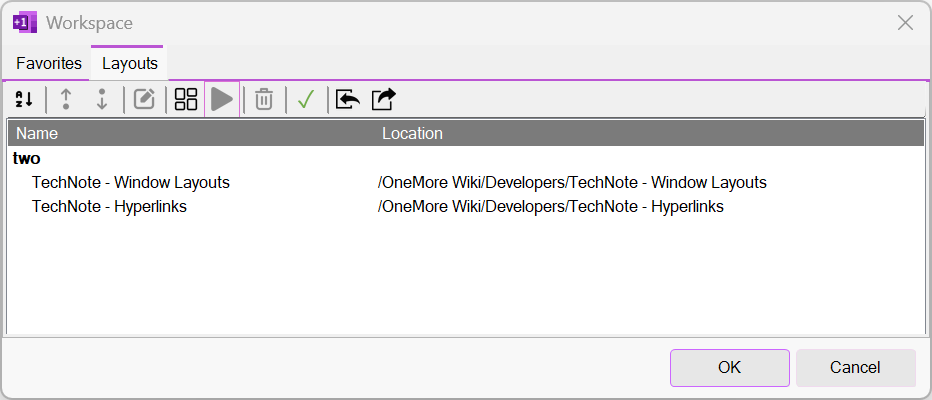
The toolbar has a number of actions to manage layouts.
- Change the stacking z-order of windows in a layout
- Rename layouts
- Rename layout windows; applies a friendly alias name to the page
- Save new layouts; if you specify the name of an existing layout, it is completely replaced with the current layout
- Restore a selected layout
- Delete a layout
- Import and export layouts
#omwiki #omcommands
© 2020 Steven M Cohn. All rights reserved.
Please consider a sponsorship or one-time donation to support ongoing development
Created with OneNote.